
Lil Planner: Visual Schedule
Space SweaterParenting
4.742.00 Reviews
- Version
- 3.0.32
- Installs
- 10.00K
- Age Rating
- Everyone
Screenshots
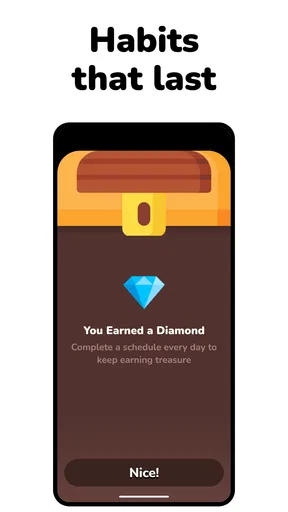
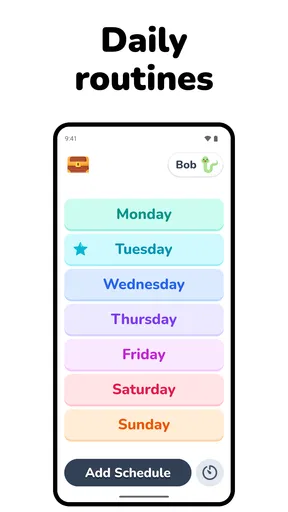
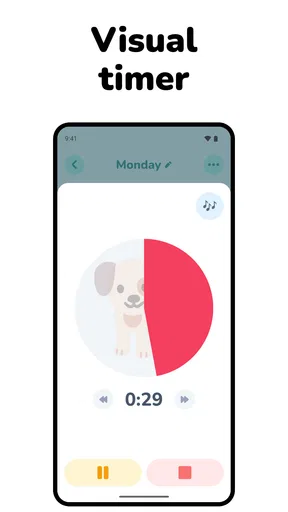
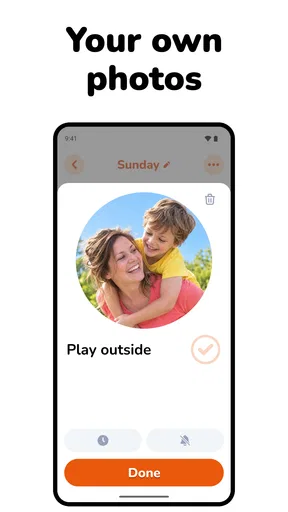
Our Review of Lil Planner: Visual Schedule
 Analysis by Appyee
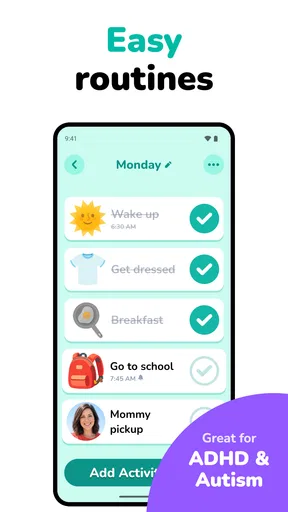
Daily routines are easy to underestimate until a child is tired, distracted, or facing a transition they do not want to make. That is where Lil Planner: Visual Schedule aims to help. I see it as a parenting app built around making the next step visible instead of leaving a child to process a long spoken list. The idea is especially relevant for children with ADHD or autism, but it can also suit younger children who are still learning how mornings, bedtime, school preparation, and other repeated tasks fit together.
My overall impression is that this is a focused tool rather than a complete family organizer. It is free to start, rated for Everyone, and developed by Space Sweater. The app has reached over ten thousand installs and holds a 4.7 average from hundreds of ratings, which suggests that its simple visual approach is connecting with the families who need it. I would recommend trying it when the real problem is routine clarity, not when you need shared calendars, detailed chore management, or a full household planning system.
How Lil Planner fits into a real family routine
The most useful way to think about this app is as a visual bridge between “what we need to do” and “what happens next.” A parent can use a sequence to turn a vague instruction such as getting ready for school into smaller, more understandable moments. The child does not have to remember the entire routine at once. They can concentrate on the current step and then move forward.
I find that distinction important because many routine apps are designed mainly for the adult managing time. Lil Planner: Visual Schedule is more child-facing in spirit. Its purpose is not simply to store tasks; it is to make the order of tasks easier to follow. That can reduce the number of reminders a parent has to repeat, although it should not be treated as a substitute for support, encouragement, or flexibility.
A realistic morning might begin with washing, getting dressed, eating, packing a bag, and leaving home. With a visual sequence, the parent can introduce the routine before the rush begins, then refer back to the same order when attention wanders. A useful trick is to keep the schedule shorter than the entire morning at first. If every tiny action is listed immediately, the screen can become another source of overload. Start with the steps that most often cause delays, then add detail only when the child understands the flow.
This is one of the app’s less obvious strengths: it can help a family identify where a routine breaks down. If the child consistently stalls at one particular step, the issue may not be motivation. The instruction might be too broad, the transition might feel abrupt, or the step might need to be divided. A visual schedule makes that pattern easier to notice than a series of rushed verbal reminders.
Visual support instead of another noisy reminder
Parents often reach for alarms, written checklists, or spoken prompts first. Those alternatives still have their place. An alarm is useful when a whole period needs a boundary, while a checklist can work well for an older child who is comfortable reading independently. Lil Planner is more helpful when the difficulty is sequencing, transitions, or knowing what comes after the current activity.
That difference also explains when I would skip it. If your child already manages written lists confidently and only needs a reminder at a particular time, a standard calendar or alarm may be faster to maintain. The visual approach becomes more valuable when the child benefits from seeing progress and needs the routine presented in a calmer, more concrete way.
I would also avoid turning the schedule into a test the child can fail. The best results are likely to come from using it as a shared reference: “Let’s see what is next,” rather than “You should already have finished.” That small change matters. A routine tool can support independence, but pressure can make the same tool feel like surveillance.
What daily use feels like
In everyday use, the app’s perceived speed is likely to depend less on demanding visual effects and more on how quickly a parent can prepare a routine that matches real life. Because the concept is narrow, the experience should feel most comfortable when the schedule has already been thought through. The setup stage deserves attention; rushing it can produce a sequence that looks organized but does not reflect the child’s actual pace.
I would prepare recurring routines at a calm time rather than during the morning emergency. Build one sequence for the most difficult part of the day, use it for several days, and adjust only what causes confusion. This workflow reduces the temptation to redesign everything after one difficult morning. It also makes it easier to tell whether the app is helping or whether the routine itself needs changing.
For a child who needs frequent transitions, the app may be opened or checked many times in a day. That is the kind of heavier use that matters here—not demanding graphics or complex processing, but repeated interaction during already busy moments. A good routine tool should disappear into the background of family life. If adults must constantly troubleshoot the schedule, it loses that advantage.
Handling busy mornings and difficult transitions
The most demanding moment is probably not the first setup but the transition between activities. A child may understand the list and still resist moving from play to dressing, from home to school, or from screen time to bedtime. Lil Planner can make the next action visible, but visibility alone does not remove emotional resistance. I would pair the schedule with a short warning before the transition and avoid adding several new instructions at once.
Another practical approach is to use the same sequence consistently while allowing reasonable variation in the surrounding circumstances. Breakfast may take longer, a preferred shirt may be unavailable, or a child may need a break. Treating the schedule as rigid can create conflict. Treating it as a dependable map with room for detours is more realistic.
For ADHD-related routines, I would pay particular attention to task size. “Get ready” may be too large to act on, while “put on socks” is concrete. For autistic children, predictability and transition support may be central, but individual needs differ widely. The app can organize a routine; it cannot determine which visual language, wording, or level of detail is right for every child. Parents will need to observe and adapt rather than assuming one template works universally.
During heavy-use periods, device handling also becomes part of the experience. If a child is meant to consult the schedule independently, the phone or tablet needs to be available without turning into a distraction. I would use a device that is already familiar and keep unrelated apps out of the routine moment when possible. This is not a flaw unique to Lil Planner, but it is an important trade-off compared with a printed chart on the wall.
Stability, recovery, and the limits of a routine app
The current version is 3.0.32, and the app has been available since September 2025. Those details give the product a defined place in its development, but they do not tell me how every device or family setup will behave. My practical advice is to test one important routine before making the app central to a time-sensitive morning. If something feels confusing, simplify the schedule first and then check whether the problem remains.
Recovery matters because routines are often used when everyone is already under pressure. If the app is closed, interrupted, or unavailable for a moment, the family should still know what comes next. I would keep a simple backup for the most important routine, such as a small paper sequence or a familiar verbal cue. That is not because the app is necessarily unreliable; it is because no digital tool should be the only support for a child’s essential transition.
The same principle applies to changes in routine. A school holiday, appointment, illness, or unexpected delay can make a carefully prepared sequence feel wrong. Before using the schedule in a new situation, I would explain the change rather than silently expecting the child to infer it. The app can support predictability, but it cannot automatically make an unpredictable day predictable.
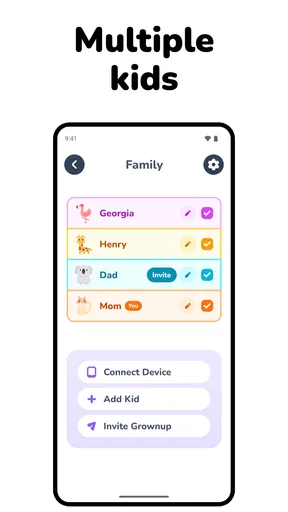
Its narrow purpose may actually help stability from a user’s perspective. A parenting app that tries to handle meals, sleep, school communication, rewards, calendars, and chores can become complicated. Lil Planner is easier to understand when you need visual sequencing and nothing more. The trade-off is that families wanting a shared, multi-person planning hub may eventually need another tool alongside it.
Device requirements and practical constraints
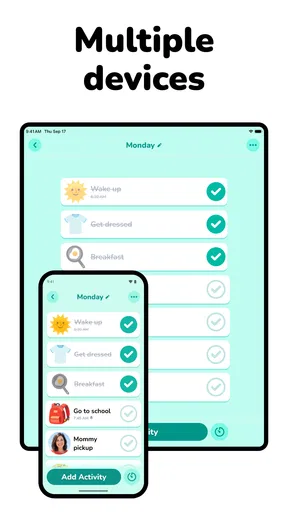
The Android version works with devices running Android 7.0 or later, so compatibility covers a broad range of phones and tablets. That is useful for families who keep an older device available for children. Still, compatibility is not the same as comfort. A small phone screen may be fine for a parent preparing a routine but less suitable for a child who needs to inspect visual steps from a distance.
A tablet can make the schedule easier to view, especially when placed in a familiar location such as a bedroom, hallway, or kitchen. On the other hand, a shared family tablet may introduce interruptions from other users, notifications, or entertainment apps. The best device is therefore not automatically the newest one; it is the one that can remain accessible without becoming a competing source of stimulation.
Resource demands are difficult to judge from the app’s purpose alone, so I would not promise that every older device will feel identical. A routine-focused application should be less demanding than a visually intense game, but the real test is whether opening it and moving through a schedule feels comfortable on the device you plan to use. If the phone is already slow in everyday tasks, that may affect the experience more than Lil Planner itself.
There is also a privacy and independence consideration in shared-device use. A young child may need help at first, while an older child may prefer to check the routine without an adult hovering. Families should decide who prepares the schedules, who changes them, and whether the child can edit anything. Clear boundaries prevent accidental changes from undermining trust in the routine.
Free access, optional spending, and long-term value
Lil Planner is free, which makes it relatively easy to test without committing money immediately. It includes in-app purchases ranging from $5.99 to $59.99 per item, so families should look carefully at what they actually need before paying. I would begin with one or two routines and judge the benefit in daily life rather than assuming that more customization will automatically produce better results.
The value depends on whether the app reduces friction. If it helps a child start tasks with fewer repeated prompts, that can be meaningful even when the routine itself is simple. If a parent still has to narrate every step, negotiate every transition, and rebuild the schedule constantly, paid additions may not solve the underlying issue. In that situation, a therapist-recommended visual system, a printed board, or a broader family planner might be the better investment.
For families comparing it with a paper chart, the digital option is easier to alter and may feel more engaging. Paper wins on instant visibility, independence from battery and connectivity, and simplicity. For families comparing it with a general calendar, Lil Planner is more child-oriented and sequence-focused, while a calendar is better for appointments, shared events, and time-based planning. Neither replaces the other completely.
Who will benefit most—and who should look elsewhere
I think this app is strongest for parents who repeatedly say the same instructions every morning, for children who respond well to visual order, and for households trying to make transitions less abstract. It may also help caregivers who want a consistent routine across different adults, because the sequence provides a shared reference instead of relying on each person to explain the day differently.
It is less convincing for families looking for detailed progress reports, household task assignment, or a complete communication system between caregivers. It may also be a poor fit if the child finds screens distracting, dislikes visual prompts, or needs a highly individualized support plan beyond what a general parenting app can provide. In those cases, an occupational therapist, educator, or specialist-designed resource may be more appropriate.
One of my favorite practical uses is not the full morning but a single troublesome transition. Try a short bedtime sequence, a leaving-the-house sequence, or the steps after school. This gives the child a manageable introduction and lets the parent evaluate whether the visual format changes behavior. If it works, expand gradually. If it does not, the result is still useful information about the kind of support that child needs.
My performance verdict after weighing everyday use
My verdict is positive but deliberately specific: Lil Planner is worth trying when the central challenge is helping a child understand and move through a repeated sequence. Its perceived performance should be judged by calmness and consistency, not by flashy speed. The app succeeds when it makes the next action obvious and reduces verbal clutter; it falls short when families expect it to manage motivation, emotional regulation, or every part of household organization.
The strongest workflow is to prepare routines away from the rush, keep the first version short, test it during one difficult part of the day, and revise based on the child’s actual response. Keep a backup for essential situations, use a suitably sized device, and resist adding detail simply because the app allows planning. Those choices will probably matter more than filling the schedule with every possible task.
Space Sweater has created a focused parenting app with a clear audience and a useful everyday purpose. With its Everyone age rating, free starting point, and strong user response, it is accessible enough for a cautious trial. I would recommend it to a parent who wants a visual routine companion, especially for ADHD- or autism-related support needs, while being honest that the best results will come from thoughtful setup and patient adult guidance.
My bottom line: choose Lil Planner when “what happens next?” is the problem you are trying to solve. Choose a calendar, alarm, paper chart, or specialist resource when your needs go beyond visual sequencing. Used within those limits, it can turn a noisy series of reminders into a clearer routine that a child can begin to understand and, over time, follow with more confidence.
Verdict
Strengths of Lil Planner: Visual Schedule
- Clear visual timelines make daily routines easy to understand.
- Customizable activities support different schedules and personal needs.
- Helpful for children, students, and users needing routine structure.
- Colorful design keeps planning more engaging than a basic calendar.
- Simple layout makes adding and reviewing tasks quick.
Limitations of Lil Planner: Visual Schedule
- Some personalization options may require in-app purchases.
- Limited usefulness if you need advanced calendar or reminder features.
- Creating many activities can become repetitive without bulk editing.
- Visual schedules may take time to set up for complex routines.
- Accessibility options may not cover every individual requirement.
Similar Picks in This Category
View All
Family Space
Motorola Mobility LLC.3.9

شرطة الأطفال - مكالمة وهمية
Oub Apps4.1

Findmykids: Parental Control
LETEM LTD4.6

Pregnancy + | Tracker App
Philips Electronics UK Limited4.8

Policía de niños - para padres
Kids police4.7

Pregnancy App
Amila4.9
Frequently Asked Questions
What is Lil Planner: Visual Schedule, and who is it designed for?
Lil Planner: Visual Schedule is a visual planning app that helps users organize daily routines, activities, and transitions with clear, easy-to-understand schedules. It can be useful for children, parents, teachers, caregivers, and anyone who benefits from visual structure. The app is especially suitable for users who find traditional written planners confusing or overwhelming.
How does Lil Planner help users follow a daily routine?
The app presents activities in a visual sequence, allowing users to see what is happening now and what comes next. This can make routines such as getting ready, attending school, completing chores, or preparing for bedtime easier to understand. By turning a long list of tasks into manageable steps, Lil Planner may reduce uncertainty and help users become more independent.
Can I customize schedules, activities, and visual elements?
Customization is one of the most important aspects of a visual schedule, and Lil Planner is intended to let families or caregivers adapt routines to individual needs. Depending on the version and available features, users may be able to create activities, arrange them in a preferred order, adjust schedule details, and use suitable images or visual cues. It is worth checking the current app listing for exact customization options.
Is Lil Planner: Visual Schedule suitable for children with special educational needs?
Lil Planner may be helpful for children who benefit from predictable routines and visual communication, including some children with autism, ADHD, developmental differences, or anxiety around transitions. However, it should be viewed as a support tool rather than a replacement for professional guidance. Every child responds differently, so parents, educators, or therapists should adjust the schedule to match the child’s abilities and comfort.
Is Lil Planner free to download, and does it require an internet connection?
The download price, subscriptions, in-app purchases, and offline capabilities can vary according to the platform and the developer’s current release. Before installing Lil Planner, review the Google Play or App Store listing to confirm the latest pricing and supported devices. Also check whether schedules, images, synchronization, or backup features require an internet connection, particularly if the app will be used away from home.
